Showing posts with label windows 10. Show all posts
Showing posts with label windows 10. Show all posts
Saturday, August 15, 2015
New Features Of Microsoft Windows 10

New features of Microsoft Windows 10
Microsoft has its users long left in the dark when it comes to a new operating system. With the latest operating system Windows 8.1, Microsoft had lost many followers, because it was a complete reorientation necessary to reach equilibrium with the tile optics. Developers and graphic artists had to listen a lot of customers and fans.
Now Microsoft has however taken the step and the new Windows 10 brought to the market. This striking changes were carried out not only in design. A change will be many users are interested, they bet riff the tile menu. Is it still there? More equal!
That has changed on Windows 10
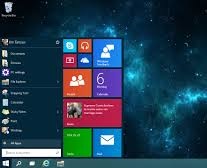
The main issue for many users is certainly whether the tile menu remains or if Windows something has come up even heavier. Basically, users can already breathe easy because the Start menu is back. Visually, Windows has the start menu on the previous Windows oriented 8 and the design of Windows 7 and a mixture of both areas introduced.
Changes have made sure the menu is automatically increased when using a tablet, but we connected mouse and keyboard, the menu again behaves classically.
In addition, Windows has sought to make working with the Apps. Take consumer apps from the Windows Store, this behavior is now the new Windows 10 like ordinary programs. This also works, of course, much easier and more user-friendly again. Represented the apps on the desktop, which is customizable in size and design course.
New Screen Layout
Microsoft has in its new operating system a bit more varied than just the looks. For example, there is now also a new enhanced screen layout and quickly switch between open applications, Microsoft has now also made possible.
Furthermore, it is known that Windows 10 now wants to surprise its users with multiple desktops. Whether Windows 10 with its App-renewal and its improved user conditions consumers now can convince again can wait.

How To Customize Windows 10 Desktop Icon?
How To Customize Windows 10 Desktop Icon?
Video Of This Tutorial:
Thanks to all of my friends.
Md. Manjurul Islam (Rubel)
Read more »
Hello friend!
How are you? I hope you are very well. Today I am working with windows 10. After installing windows 10, I face some critical problem with customizing windows 10 desktop icon.
After few munities later I found a solution, how to customize windows 10 desktop icon. Today I am going to show you how to do this. If you face the same problem, please follow my bellow procedures.
Right click on the desktop ---> Now click on Personalized ---> after clicking on personalized you will see a new window. Now click on Themes ---> From the right side click on Desktop icon settings ---> After clicking on Desktop icon settings, you will see a new window ---> Now select the desktop icon which icon you want to show on your desktop. After doing this click Apply then Ok. Work is finished.
Video Of This Tutorial:
Thanks to all of my friends.
Md. Manjurul Islam (Rubel)
Preview from Windows 10

Preview from Windows 10
Many users like to sit in front of the computer excited to finally be able to download the preview of the new operating system Windows 10. There have grown up already many rumors about the new features of the operating system. Some were already known, including the innovation of the recurring start menu.
The Preview Windows provides, of course, does not solve all the secrets to the new operating system, but consumers can already test some apps and controls in order to get a first taste.
It is well known until now that Microsoft has made numerous changes to the design and is returned to a much lighter operating structure. So you can look forward to the Preview. In the following article we shall now briefly explain to what extent the preview of Windows 10 is available and what is inside.
What's in the preview there?
This is probably the most frequently asked question! What's in the new Windows 10? Users can now take the first steps with the Preview. Of course, users are not all Apps and original components of the operating system in the free download version is available, although Windows has designed the Preview quite lush.
Users enjoy the right, for example, the new Photos app, which is available as Universal-app on other devices. The Control Panel will be replaced against an app version, in addition users a preview version of the App Store can enter in January Preview. However, the new Start menu is already available on the Preview.
If you want to use the speech bubble icon in the notification area, an earlier version of the new action bar appears in Windows 10. In the end also has the Explorer get a little refresher. In the order entry user now be found under "General" a small drop-down menu.
No language assistant
Must on what consumers in Preview unfortunately refrain is the language assistant. If you want to still try the Cortina language assistant, helps only the handle to the English version. Here it is also already known that the Windows is to have 10 Preview slight stability problem.
What should install private user?
If you want the Preview as a private person also test and whether to see only the appearance, or simply to even the new Desktop, then pick up the Preview normal January.
Whether a switch from preview of the final version is possible later, at the present time cannot be determined, you will therefore have to be surprised.
The Preview of Windows 10, you can download it from Microsoft.
With release of Windows 10, networks are only 10 Tips

With release of Windows 10, networks are only 10 Tips
Microsoft hires network of 40 terabytes to distribute the Windows update over the world.
Thousands of computers around the world have Windows 7 or Windows 8.1 installed. Now imagine offer for free a new system and correcting design flaws and appeals to both Windows 7 users as of 8? Even better, for free?
Well, that's what Microsoft has done and is putting in all the tests CDN network that distributes the new Windows 10 that will update the previous systems.
Internal sources of the company are saying that Microsoft has reserved about 40 terabytes of data speed that can travel on your Windows distribution network 10. And since the day July 28, 2015, at 13:00 ET, Microsoft was already reporting a consumption of more than 10 Tbps, and not all regions of the world (America, Asia, Africa, Asia, etc) were upgrading.
For comparison we have Apple events are known by high network usage peaks around the world, at about 8 Tbps, which means that the deployment of Windows 10 could be five times that of any Apple event.
It sure is a massive deployment where Windows 10 is being requested by thousands of machines from today.
Windows 10 will be the last version of the operating system
Windows 10 will be the last version of the operating system
 According to Microsoft itself, the Windows 10 is the latest version of its flagship product and most used operating system in the world.
The Windows 10 will be released this year, probably in September and will be the last, according to Jerry Nixon, Microsoft executive who spoke at the conference of the company.
It seems that Microsoft is planning to launch a "Windows Service" where users could pay an annuity and regularly get system updates and new versions every one or two years.
Windows 10 has an advanced development architecture and because of this the company can separate the operating systems that are part of Windows, leaving the individual applications that can be updated independently without the need to change any software.
If all goes well with the project, it is likely that within a few years no one else worry if the version that uses a computer is Windows 7, 8, 10, being just "Windows".
It's an interesting idea and would not need to have to reinstall the operating system when a new version was launched and we could also keep computers updated with the latest versions of Windows easily.
For those who use Linux, such as Ubuntu, you know how much it's easy and it works most of the time.
Windows 10 is now available for download and update free

Windows 10 is now available for download and update free
Windows 10 is officially launched today without much fanfare and is being highly anticipated by users who did not like the Windows 8.
As we mentioned earlier, the Windows 10 final version RTM build was officially launched to the public today, on 29/07/15 and is now available for download or upgrade for free.
Who has Windows 7 or 8.1 genuine and activated can upgrade to Windows 10 without paying anything. But should be aware that this update will be free until the 28th and July 2016, ie, you should decide whether to spend your current system to the new version within 1 year from today.
How do I upgrade my Windows 7 or 8.1 to Windows 10?
In the notification area of the Windows taskbar (icons that are close to the clock) should appear an icon with the stark white of the Windows symbol.

Double-click this icon and a window with information about the update for Windows will appear.

Now just click on the "Book your free upgrade" button and wait.
How to know if you upgrade from Windows 10 is being downloaded?
From the moment you click "Book your free upgrade" nothing seems to happen on your computer and no download bar is shown.
This is why you booked the update and it is downloaded on demand and bandwidth availability in the Microsoft CDN networks, which must be crowded in the early days of the update.
But to know when the update is beginning to be downloaded, simply open the Explorer (press the Windows key on the keyboard and E) and activate the option to display "Files, folders and hidden units" for this:
Windows 7: Click "Organize" and then "Folder Options and research." On the "View" look "Hidden files and folders" and check the "Show files, folders and hidden units."
Windows 8: Click "Windows (C :)," then on "View" and check the "Hidden Items" option.
Accessing the C: drive (Local Disk (C :) or Windows (C :)) a directory called $ Windows. ~ BT "or" $ Windows. WS ~ "should appear. This means that Windows 10 is being downloaded and soon must update your system. If not, you must wait your turn, because Microsoft is available for all gradually the system.
Subscribe to:
Posts (Atom)